Dual subtitles on HBO Max
Add dual subtitles to HBO Max in Chrome: the HBO Max subtitle on top, a translation in your language under it. Setup steps and known limits.
Updated
How to turn on dual subtitles on HBO Max
Get Lingosive for Chrome
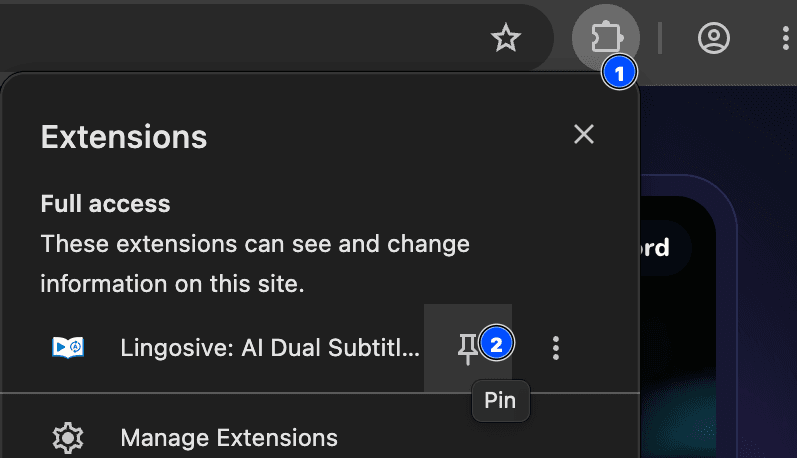
Install Lingosive from the Chrome Web Store in Chrome on your computer. You can pin the icon from Chrome's extensions menu to open the side panel quickly.
Play a title in the HBO Max web player
Start a show or movie in your browser. Lingosive runs on the watch page of the web player at play.hbomax.com or play.max.com, not on the HBO Max homepage.
Choose subtitles in the language you're learning
Open the player's subtitle menu and pick your target language. If subtitles are set to Off, Lingosive has nothing to show.
Turn on Double Subtitle
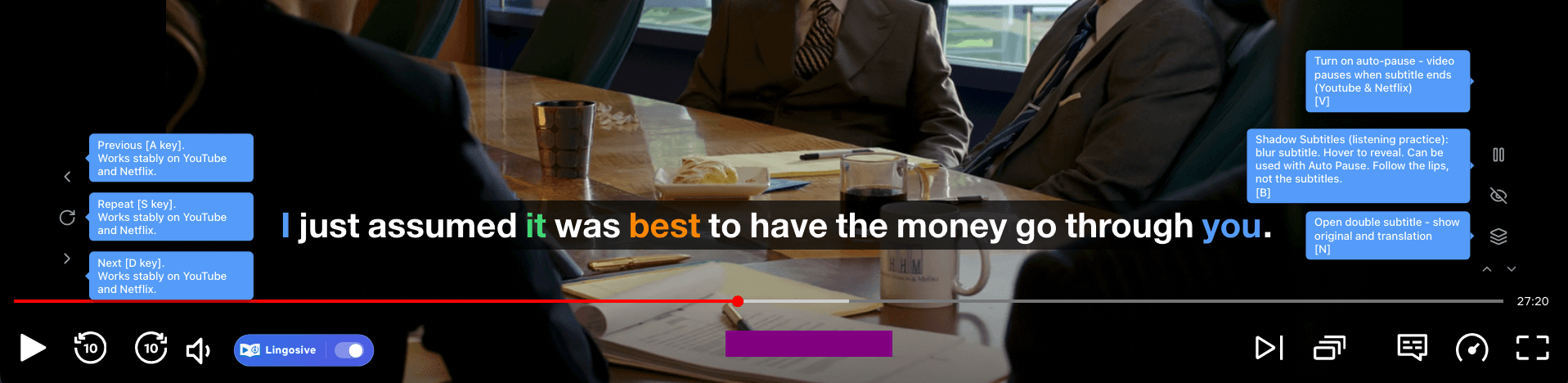
Once the show itself is playing, click the layers icon to the right of the subtitle or press N. The translation in your native language appears under each line.
How to get dual subtitles on HBO Max
HBO Max lets you turn on one subtitle language at a time. With the Lingosive extension in Chrome on your computer, you get dual subtitles on HBO Max: the subtitle track you picked stays on top, and a machine translation into your language appears under each line. Install the extension, start a title in the web player, choose subtitles in the language you're learning and press N.
The HBO Max web player and Lingosive
Lingosive works in the HBO Max web player, at play.hbomax.com and at play.max.com, and it starts once you're on a title's watch page. The max.com website outside the player doesn't get Lingosive subtitles, so open the title itself.
It reads the subtitle track you have switched on, hides the HBO Max subtitle and draws the same text as an interactive line, with the translation underneath. Because that second line is a machine translation and not an HBO Max track, it doesn't matter whether HBO Max offers subtitles in your native language. What you need is a subtitle track in the language you're learning.
Two things are worth knowing in advance. First, ads: while an ad is on screen, Lingosive can't attach its subtitles. Let the ad finish, and if the lines are still missing when the show begins, refresh the page. Second, timing: on HBO Max, Lingosive lines up its subtitle with the text the player shows on screen. That keeps the two in sync, but small issues can sometimes happen, and a refresh is again the first thing to try.
Watching HBO Max to learn a language
Fast, overlapping dialogue is hard to follow in any language you're still learning. A few settings help you keep up:
- Hover to stop. Rest the mouse on a subtitle and the video pauses, so you can read both lines and click a word.
- Hold each line. By default, "Subtitle hold extension" leaves a line on screen for up to 3 seconds after it ends, until the next one starts. Raise or lower it to suit your reading speed.
- Replay with W. Press W to hear the current line again, Q to go back one.
- Move the subtitles. Drag them up or down with the handle next to the subtitle, and set the font size for HBO Max on its own.
As the original line gets easier, press N to hide the translation, or press B to blur the subtitle and listen before you look. If you want Auto Pause, which stops after every line, watch with dual subtitles on YouTube or Netflix, where it's available.
Keep the words you find
Sign in to save words and phrases: up to 100 on the free plan; Premium removes the cap. They sync to the web learning center and the Lingosive iOS and Android apps, where spaced-repetition flashcards bring them back for review. Hear a word you met in a series in other real scenes with Word in Film. Also watching Disney+? Here's how to get dual subtitles on Disney+. When you're ready, download Lingosive and turn on Double Subtitle for your next HBO Max episode.
What works on HBO Max
Clickable HBO Max subtitles
Lingosive hides the HBO Max subtitle and draws the same text as its own line. Hover a word for a quick translation, or click it for meanings, examples, pronunciation and a Learn button that saves it to your list.
Pause the moment you hover
On HBO Max, the video stops as soon as your mouse is over a subtitle, so fast dialogue doesn't run away from you while you read.
Lines stay on screen a little longer
"Subtitle hold extension" keeps each line on screen for up to 3 seconds after it ends (never past the start of the next line), which gives you time to read both lines. You can shorten it or set it to 0 in Settings → Subtitle & Display.
Subtitles sized for HBO Max
Change the font size with the − and + buttons next to the subtitle; Lingosive remembers the size separately for each platform. Pick a typeface and background opacity, and drag the subtitles up or down.
Q, W and E to replay lines
Q jumps back a line, W repeats the current one and E moves on. You can rebind the keys in Settings → Controls.
Hide the playback bar
In Settings → Auto-Hide Controls, switch on HBO Max and the playback bar under the video stays hidden until you point at it, so it doesn't sit over your subtitles.
Limits on HBO Max
- Lingosive doesn't attach its subtitles while an ad is on screen; if they're still missing once the show starts, refreshing the page can help.
- Subtitles must be on in HBO Max; with the subtitle track set to Off, there's nothing to show.
- It works in the web player at play.hbomax.com and play.max.com only, not on the max.com homepage or in the HBO Max apps for phones, tablets and TVs.
- Auto Pause and the slower repeat work on YouTube and Netflix, not on HBO Max.
- Small issues can sometimes happen on HBO Max, and previous, repeat and next line work most reliably on YouTube and Netflix.
Does Language Reactor work on HBO Max?
As of October 2026, Language Reactor doesn't list HBO Max. Its getting-started guide says the extension adds language learning tools to the Netflix and YouTube websites, and we couldn't find HBO Max mentioned anywhere on its site. Its FAQ answers a general question about other platforms, "Do you support Disney+/Amazon Prime/Android/etc?", with "We do not support these platforms yet, but might in the future."
Lingosive works in the HBO Max web player (play.max.com and play.hbomax.com) in desktop Chrome, as described on this page, and also on YouTube, Netflix, Prime Video and Disney+. If Netflix and YouTube are all you watch, Language Reactor covers both well.
Sources: Language Reactor FAQ · Language Reactor: getting started
Checked . Products change; if a detail here no longer matches, the linked page is the one to trust.
Lingosive vs Language ReactorFrequently asked questions
Can I watch HBO Max with dual subtitles?
Yes, in Chrome on a computer. Turn on HBO Max subtitles in the language you're learning, then switch on Double Subtitle in Lingosive to get a translation in your language under each line.
Does it work on Max?
Yes. Lingosive runs in the web player at both play.max.com and play.hbomax.com, so it works whichever of the two addresses your browser opens.
Why are there no Lingosive subtitles during ads?
While an ad is playing, Lingosive can't attach its subtitles to the player. Wait for the show to start; if the subtitles still don't appear, refresh the page.
Is the translation one of the HBO Max subtitle tracks?
No. The top line is the HBO Max track you selected. The bottom line is machine translation from Lingosive's server, into any of 68 languages.
Do I need an account?
Dual subtitles and word translations work without one. A free account lets you save up to 100 words and get a limited number of Lingosive AI explanations each day; Premium removes the 100-word limit and the daily AI limit.
Can I use it on my phone or TV?
No. The HBO Max apps can't run Chrome extensions, so dual subtitles need the web player in desktop Chrome. You can still review the words you saved in the Lingosive iOS and Android apps.
Dual subtitles on other platforms
Keep exploring
- Word in filmSee any word used in real movie scenes.
- Learn Spanish with TV series and moviesTV series and movies ranked by how hard they really are, with the words to learn first.
- Lingosive vs Language ReactorAn honest side-by-side: where each one works, mobile, AI and free plans, with sources.
- How to Learn English with TV Shows in 5 StepsLearn English with TV shows: choose a series by measured difficulty, move from dual subtitles to none, study s…
- Learn Korean with K-Dramas: What to Watch and How to StudyLearn Korean with K-dramas: read Hangul first, show Korean and English subtitles at once, handle speech levels…
- Can You Have Two Subtitles on Netflix on Your TV or Phone?No, not in Netflix's TV, phone or tablet apps. Here's where two subtitles do work, how to get both on your TV,…
Start practicing today!
Get started for free
The extension works in Chrome, Edge and Brave on a computer.
All download optionsLingosive is an independent product and is not affiliated with, endorsed by or sponsored by HBO Max or Language Reactor. All product names and trademarks belong to their respective owners.