Dual Subtitles: What They Are and How to Get Them
Dual subtitles put two languages on screen at once: the original subtitle line and a translation in your language right under it. Lingosive's free browser extension adds them to Netflix, YouTube, Prime Video, Disney+ and HBO Max in Chrome, Edge and Brave on a computer. The subtitle you choose stays on top, a machine translation appears underneath, and you can hover over or click any word to see what it means.
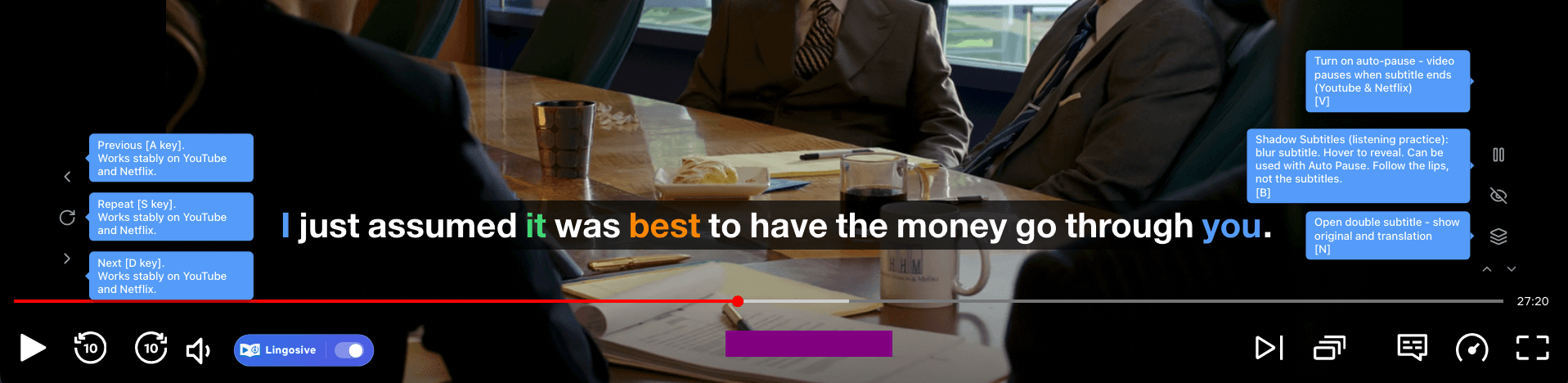
What are dual subtitles, and do they help you learn?
Dual subtitles, also called bilingual or double subtitles, show each line in two languages: the original on top and a translation underneath. Captions are different: they show the words in the same language as the audio. With both lines on screen, you can follow the story and still see how each sentence is said in the language you're learning.
Research suggests they help, with a catch. In a 2022 study in the journal Language Learning, 112 intermediate to advanced Chinese learners of English watched a documentary in one of four versions: with bilingual subtitles, English captions, Chinese subtitles or none. The bilingual group was better than the captions group at recognizing what the new words meant, but worse at recognizing the new words themselves. They spent more time reading the Chinese translations than the English words, and the attention they paid to the English words, not to the translations, was what predicted learning.
So use the translation as a safety net: read the original line first, look down only when you're lost, and hide the translation once you can follow most of the story. In Lingosive, N turns the translation line off and on, and B blurs the subtitle until you hover over it.
Source: Wang & Pellicer-Sánchez (2022), Language Learning 72(3)
How to get dual subtitles on each platform
Each guide walks you through the setup on that site and lists, honestly, what works there and what doesn't.
- YouTube dual subtitlesWatch YouTube with dual subtitles: the captions you pick on top, a translation in your language under each line. Auto-generated captions work too.
- Netflix dual subtitlesWatch Netflix with dual subtitles: the subtitle track you choose on top, a translation in your language below. Click any word to look it up and save it.
- Prime Video dual subtitlesGet dual subtitles on Prime Video in Chrome: the Prime Video subtitle on top, a translation in your language below, and words to click and save.
- Disney+ dual subtitlesWatch Disney+ in Chrome with the subtitle you choose on top and a translation in your language under it. Click any word to look it up.
- HBO Max dual subtitlesAdd dual subtitles to HBO Max in Chrome: the HBO Max subtitle on top, a translation in your language under it. Setup steps and known limits.
How it works
Add Lingosive to Chrome
Install the free extension from the Chrome Web Store in Chrome on your computer.
Open a video with subtitles
Start a video and turn on its subtitles in the language you're learning. Lingosive reads that subtitle track.
Turn on dual subtitles
Click the Double Subtitle button next to the subtitle, or press N. A translation appears under each original line.
Can you get dual subtitles on a phone, tablet or TV?
Not in the streaming apps. Lingosive's dual subtitles need a browser on a computer, because the Netflix, YouTube, Prime Video, Disney+ and HBO Max apps for phones, tablets and TVs can't run browser extensions. You still have two good options.
On a TV
Play the show in Chrome on your laptop and connect the laptop to the TV with an HDMI cable. Both subtitle lines show up on the big screen.
On a phone or tablet
The Lingosive app for iPhone, iPad and Android doesn't play Netflix or the other services, but it has its own library of 400,000+ YouTube videos and podcasts with a translation line, slow-down and line repeat, in English, Spanish, French, German, Italian, Portuguese, Russian and Japanese. The words you save on your computer sync to the app for review.
Browser extension or media player?
It depends on where the video comes from. Streaming services play inside their own website or app and don't hand you a video file, so for Netflix, YouTube, Prime Video, Disney+ or HBO Max in a browser, you need an extension. Lingosive reads the subtitle track the site already provides and adds a translation under each line.
For video files saved on your computer, use a desktop media player that can show two subtitle tracks at once, such as mpv, with a subtitle file in each language. Lingosive doesn't play local video files.
Frequently asked questions
Does Netflix have dual subtitles?
Not on its own: Netflix shows one subtitle track at a time. With Lingosive on netflix.com in a computer browser, the track you pick stays on top and a translation in your language appears under it.
Can YouTube show two subtitles at once?
Not by itself: the YouTube player shows one caption track at a time. Lingosive keeps the captions you turn on and adds a translation under every line.
Are dual subtitles free?
Yes. Dual subtitles and word translations work without an account. A free account saves up to 100 words and phrases and includes 10 AI explanations a day; Premium removes those limits.
Which browsers can I use?
Chrome, Edge, Brave and other Chromium browsers on a computer. There's no Lingosive version for Firefox or Safari.
What if a show has no subtitles in my language?
It still works. The bottom line is Lingosive's machine translation, not a second subtitle track from the platform, so you only need subtitles in the language you're learning. Machine translation can occasionally get a line wrong.
Which languages are supported?
The top line can be any subtitle language a title offers, and word lookups work best in 37 subtitle languages. The translation line can be in any of 68 languages; choose yours in the side panel under Settings → General → "Your Native Language".
Keep exploring
- Word in filmSee any word used in real movie scenes.
- Best Dual Subtitles Chrome Extensions (2026)Dual subtitles Chrome extensions compared: which work on Netflix, YouTube, Prime Video, Disney+, HBO Max or Ud…
- Language Learning with Netflix: 2026 GuideLanguage learning with Netflix works when you watch actively: target-language subtitles, a translation line un…
- Can You Have Two Subtitles on Netflix on Your TV or Phone?No, not in Netflix's TV, phone or tablet apps. Here's where two subtitles do work, how to get both on your TV,…
Start practicing today!
Get started for free
The extension works in Chrome, Edge and Brave on a computer.
All download optionsLingosive is an independent product and is not affiliated with, endorsed by or sponsored by YouTube, Netflix, Prime Video, Disney+, or HBO Max. All product names and trademarks belong to their respective owners.