Language Learning with Netflix: 2026 Guide
Language learning with Netflix works when you watch actively: target-language subtitles, a translation line underneath and saving words to review.
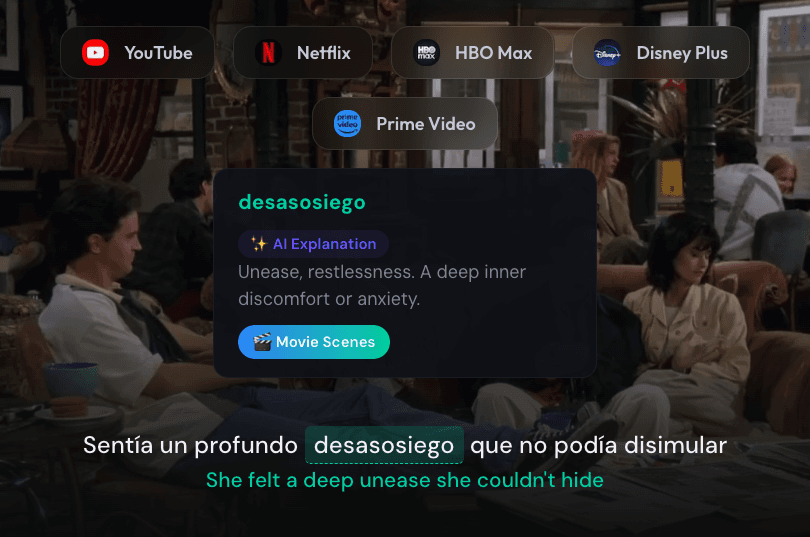
Language learning with Netflix works when you watch actively: pick a show close to your level, turn on subtitles in the language you're learning with a translation line underneath, and save the words you look up so you can review them later. Netflix on its own shows one subtitle track at a time, so the usual way to get both lines on screen is a browser extension on a computer.
Looking for the extension once called Language Learning with Netflix? It's now Language Reactor; the next section explains what changed and what your options are today. Lingosive, the extension we make, is free to start: get it for Chrome, Edge or Brave.
Language Learning with Netflix Is Now Language Reactor: What Changed
Language Learning with Netflix was the original name of the extension now called Language Reactor. Its own update history shows the path:
- September 2018: launched as Language Learning with Netflix.
- May 2020: YouTube support added.
- March 2021: the Netflix and YouTube extensions merged into Language Reactor.
It's the same tool from the same developer, Dioco, and its Chrome Web Store listing still says it was formerly called Language Learning with Netflix. The old languagelearningwithnetflix.com address still opens a page under the old name.
What it does today. As of November 2026, Language Reactor's extension adds its tools to the Netflix and YouTube websites in Chrome on Windows and macOS. It's free to use, with an optional Pro subscription: on Netflix, the free plan shows Netflix's own subtitle tracks, while machine translation, speech recognition and saving words outside its PhrasePump exercise are part of Pro. Its FAQ says Disney+, Amazon Prime and Android aren't supported yet, and we found no Firefox or Safari version and no iOS or Android app from its maker; its website works in a phone browser.
Your options now. If you watch only Netflix and YouTube at a computer, Language Reactor still does the job, and its free plan is generous. If you also watch Prime Video, Disney+ or HBO Max, or want your saved words on your phone, Lingosive adds dual subtitles on all five and has iOS and Android apps. Our Lingosive vs Language Reactor comparison gives a source for every row, and the extension table further down adds Migaku and Trancy.
Does Language Learning with Netflix Actually Work?
Is Netflix good for learning a language? For listening and vocabulary, yes, as long as you can follow most of what's said. Linguist Stephen Krashen's input hypothesis, the idea that we acquire language by understanding messages rather than by drilling rules, has shaped language teaching for decades. If you roughly follow a scene, you can often work out an unfamiliar word from context.
Research backs this up. In a study by Peters and Webb (2018), Dutch-speaking learners of English watched a single hour-long TV program and picked up the meanings of some new words without setting out to learn them. Words that came up more often were more likely to be learned, and learners with larger English vocabularies learned more. A 2013 meta-analysis of 18 studies by Montero Perez, Van Den Noortgate and Desmet, published in System, found a large effect of captions (subtitles in the same language as the audio) on both listening comprehension and vocabulary learning.
Stories help as well: many learners find that a word from a tense or funny scene sticks better than one from a list. The limits are real, though. Passive watching is slow, a native-speed episode is tiring at low levels, and watching alone won't get you speaking: that takes practice out loud, such as conversation or shadowing.
Set Up Netflix for Language Learning (No Extension Needed)
Start with the settings Netflix already has:
- Make a profile for the language you're learning, so your usual one stays as it is. Each profile keeps its own display language and its own audio and subtitle languages: in a browser, go to Account → Profiles → choose the profile → Languages. Setting the display language to the one you're learning puts the Netflix menus in it too.
- Pick audio and subtitles in the player. During playback, click the screen and choose Audio & Subtitles. For a show made in the language you're learning, pick the audio marked [Original]. On a dubbed title, the subtitles and the dubbed audio are often translated separately, so what you read may not match what you hear.
- Missing a language? Check the profile. The Netflix Help Center says the languages you see depend on your location, the title, your device and your profile's language preferences. Add the language under Audio and subtitle languages in the profile; if it still doesn't appear, that title has no track in that language where you live.
- Search by language. In 2026, Netflix added Search by Language, which finds titles by language from the search bar on any device. On a computer, netflix.com/browse/subtitles and netflix.com/browse/audio list titles by subtitle or audio language.
None of these settings puts two subtitle languages on screen: Netflix shows one subtitle track at a time.
Which Subtitle Setup Fits Your Level
In the table, target language means the language you're learning.
| Level | Audio | Top line | Translation line | Why |
|---|---|---|---|---|
| Beginner | Target language | Target language | On | Follow the story, match sounds to words |
| Intermediate | Target language | Target language | Hidden; press N when stuck | Read the original first, check only when lost |
| Upper intermediate | Target language | Blurred with B; hover to reveal | Off | Listen first, read only to confirm |
| Advanced | Target language | Off, or Blur only for checking | Off | Listen like a native viewer |
Subtitles only in your own language are the weakest choice for learning: it's easy to end up reading your language instead of listening to the new one. The usual path runs from a translation line, to target-language subtitles alone, to none. Move down a row once you rarely need the line you'd drop.
How to Get Two Languages on Screen (Computer Browser)
- Install Lingosive from the download page. It runs in Chrome, Edge, Brave and other Chromium browsers; there's no Firefox or Safari version.
- Choose your native language and the language you're learning. The translation line uses your native language, which starts as your browser's language; change it in the side panel under Settings → General → "Your Native Language".
- Start a title on netflix.com and choose subtitles in the language you're learning under Audio & Subtitles.
- Press N, or click the layers icon to the right of the subtitle, to add the translation line.
- Still seeing only the usual Netflix subtitles? Flip the switch on the Lingosive button next to the volume control. Clicking the button's logo opens the side panel.
The top line is the Netflix track you picked, redrawn so every word is clickable, even in full screen. The bottom line is Lingosive's machine translation, not a second Netflix track. That's why it works when a title has no subtitles in your language, and why it can differ from the translation Netflix offers.
Two limits: the title needs a subtitle track in the language you're learning, and Lingosive doesn't work in the Netflix apps for TVs, phones or tablets. Both lines work without an account; saving words takes a free one. Lingosive is independent and isn't affiliated with Netflix. Our Netflix dual subtitles guide covers the shortcuts and settings in full.
Pick Shows at Your Level: What Makes Dialogue Hard
The biggest choice in language learning with Netflix is the show. Three things shape how hard its dialogue feels:
- Speech speed: how many words people say per second.
- Vocabulary coverage: how much of the dialogue is made up of the 2,000 most common words. The lower it is, the more words you'll look up.
- Genre: comedies pack in wordplay, slang and cultural references.
Here are six well-known series from Lingosive's measurements of English dialogue, sorted by level (1 is easiest, 5 hardest):
| Show | Level | Words per second | Top-2,000 word coverage |
|---|---|---|---|
| Breaking Bad | 4 | 3.4 | 86.6% |
| Better Call Saul | 4 | 3.4 | 84.9% |
| Peaky Blinders | 4 | 3.4 | 84.8% |
| Friends | 4 | 3.2 | 83.4% |
| BoJack Horseman | 5 | 3.6 | 86.3% |
| The Office | 5 | 3.3 | 83.7% |
Netflix availability varies by country, and these numbers describe the English dialogue only. What they suggest for any language:
- Short episodes aren't automatically easier. Most of the sitcoms and animated comedies we've measured land at level 5, while most of the dramas, such as Breaking Bad, land at level 4.
- Check speed and vocabulary together. Friends is the slowest of the six but has the lowest coverage; BoJack Horseman is the fastest but has the second-highest coverage.
- A show you've already seen is easier, because the plot no longer needs your attention.
Our English show index lists every title we've measured, with real scenes to watch. In the extension, the side panel's Catalog tab lists Netflix films and series by language, sorted by IMDb rating or year.
What to Watch on Netflix in 7 Languages
Catalogs and subtitle tracks vary by country, so check that each title lists audio and subtitles in the language shown before you start.
| Language | Show | Good for |
|---|---|---|
| Spanish | Money Heist (La Casa de Papel) | Spanish from Spain, gripping heist plot |
| Spanish | Club de Cuervos | Everyday Mexican Spanish |
| Spanish | One Hundred Years of Solitude (Cien años de soledad) | Literary Colombian Spanish (advanced) |
| French | Lupin | Contemporary Parisian French, from formal to street |
| French | Call My Agent! (Dix pour cent) | Fast, overlapping showbiz talk (advanced) |
| French | Furies | Crime-thriller vocabulary for action fans |
| German | Dark | Standard German, measured pace, complex plot |
| German | The Last Word (Das letzte Wort) | Everyday family conversation |
| Korean | Crash Landing on You | Formal and informal speech, plus North Korean accents |
| Korean | Squid Game | Everyday modern Korean in a thriller many viewers have already seen |
| Japanese | Terrace House: Tokyo 2019–2020 | Unscripted, natural conversation |
| Japanese | First Love | A gentle, slower-paced drama |
| Italian | Suburra: Blood on Rome | Roman dialect and fast dialogue (advanced) |
| Italian | Zero | Contemporary slang in multicultural Milan |
| Portuguese | 3% | Brazilian Portuguese with sci-fi vocabulary |
| Portuguese | Glória | European Portuguese, plus some English, in 1968 |
Learning Spanish? Our guide to learning Spanish with Netflix sorts shows from beginner to advanced.
A 30-Minute Routine: Study, Not Just Watch
Here's how to learn a language with Netflix in about 30 minutes a day, using 20 minutes of an episode: a whole sitcom episode or about half a drama episode.
- Watch with the translation line on. When a word stops you, hover for a quick translation, or click for other meanings, pronunciation and a Learn button that saves it. The card also lists up to five lines from the same episode that use the word, with times you can jump to. Save about five words.
- Replay the hard lines. A goes back a line, S repeats it and D moves on. V turns on auto-pause, which stops the video at the end of each line.
- Rewatch one scene without the translation. Hide it with N, or press B for Blur mode. With auto-pause and Blur both on, repeats play slower (0.80× by default, on Netflix and YouTube only).
- Ask Lingosive AI about one puzzling word. It explains the word in its sentence: what it means there, a short grammar note when it helps, and synonyms. Free accounts get a limited number of explanations a day; Premium removes the daily limit.
- Hear your words in other scenes. Click "Film scenes for this word" on the word card, or search any saved word or phrase in Word in Film. It covers English, Spanish, French, German and Japanese, and the free plan lets you search for 3 different words or phrases a day (repeat searches and searches with no results don't count); Premium removes that limit.
- Review later on your phone. Saved words sync to the Lingosive app as FSRS spaced-repetition cards (meaning, word, writing and listening) in English, Spanish, French, German, Italian, Portuguese, Russian and Japanese.
A free account saves up to 100 words and phrases; Premium removes that limit.
Keep Going on Your Phone (Without Netflix)
The Lingosive app doesn't play Netflix or add subtitles inside the Netflix app. What it has, on iPhone, iPad and Android:
- 400,000+ YouTube videos and podcasts picked for learners and filtered by level, with a translation line, slow-down and line repeat, in English, Spanish, French, German, Italian, Portuguese, Russian and Japanese.
- A reader with 15,000+ books, where the first 20 pages of every book are free.
- Your saved words, ready for review.
The free plan includes 5 minutes of video a day, and there's no offline mode. More on the Lingosive app.
Netflix Language Learning Extensions Compared
All four tools below work on netflix.com in a desktop browser, including Language Reactor, the former Language Learning with Netflix. As of November 2026, from each product's own site, manual or store listing:
| Tool | Also works on | Browsers | Phone app | Free plan |
|---|---|---|---|---|
| Lingosive | YouTube, Prime Video, Disney+, HBO Max | Chrome, Edge, Brave and other Chromium browsers | iOS and Android | Yes; Premium removes its limits |
| Language Reactor | YouTube | Chrome on Windows and macOS | None from its maker; its website works on phones | Yes; optional Pro |
| Migaku | YouTube, Disney+, Rakuten Viki, Animelon | Chrome | iOS and Android | No; 10-day money-back guarantee |
| Trancy | YouTube, Disney+, HBO Max, TED, Udemy, Coursera, edX | Chrome, Edge, Firefox, Brave, Arc, Safari | iOS and Android | Yes; optional Premium |
The phone apps are for other videos and review: Migaku's and Trancy's center on YouTube, and Lingosive's plays its own library. Beyond the table, Language Reactor exports saved words to Anki and covers 40+ languages, Migaku turns sentences into flashcards with a screenshot and audio and adds tools for Japanese and Mandarin, and Trancy also translates web pages and PDFs. Lingosive is the only one of the four that lists Prime Video, and its free plan includes a daily allowance of AI explanations and Word in Film searches. If you like Migaku's flashcard-first approach but want a free plan, our roundup of Migaku alternatives compares the options side by side.
For sourced, row-by-row comparisons, see Lingosive vs Language Reactor, Lingosive vs Migaku and Lingosive vs Trancy, or our roundup of dual subtitles Chrome extensions.
Lingopie takes a different route: it's a streaming service with its own catalog of shows and movies for learners, so you can study with its shows without a Netflix subscription. Our guide to Lingopie's free trial and pricing explains how its 7-day trial works and what each plan includes.
Common Mistakes
- Subtitles only in your own language: you end up reading instead of listening.
- A show far above your level: if you need the translation for almost every line, pick an easier one.
- Pausing on every unknown word: save it and move on; the useful words come back.
- Never reviewing: saved words you never see again tend to fade within days.
- Expecting to speak from watching alone: speaking takes practice out loud.
Frequently Asked Questions
Can you learn a language just by watching Netflix?
Not on its own. Watching builds listening comprehension and a wide passive vocabulary, especially with subtitles in the language you're learning, but speaking and writing need output. Treat Netflix as the input half of your routine and add practice out loud, such as conversation or shadowing.
What happened to the Language Learning with Netflix extension?
It's now called Language Reactor. In March 2021 its Netflix and YouTube extensions were merged under that name; it comes from the same developer, Dioco, and works on Netflix and YouTube in desktop Chrome. See our sourced Lingosive vs Language Reactor comparison.
Can I use two subtitles on the Netflix app on my TV or phone?
No. The Netflix apps for TVs, phones and tablets show one subtitle track and can't run browser extensions, so Lingosive's two lines work only on netflix.com in a computer browser. For the big screen, connect the laptop to your TV with an HDMI cable. On a phone, the Lingosive app has its own video library and your synced words.
Should I watch with subtitles in my language or the language I'm learning?
The language you're learning, with a translation line at first; then hide the translation, and later switch to Blur mode or no subtitles. Subtitles only in your own language help more with the plot than with your listening.
How many times should I watch the same episode?
Twice is a good default: once with the translation line to follow the story, then again, or just the hardest scene, without it. A third viewing with no subtitles shows how much you now catch by ear. If you still need the translation for most lines the second time, switch to an easier show.
How much time a day should I spend learning with Netflix?
Consistency beats length: about 30 minutes a day, with 20 minutes of watching plus saving and a short review, does more than an occasional binge.
Start practicing today!
Get started for free
The extension works in Chrome, Edge and Brave on a computer.
All download optionsKeep reading
- Learn Korean with K-Dramas: What to Watch and How to StudyLearn Korean with K-dramas: read Hangul first, show Korean and English subtitles at once, handle spe…
- How to Learn English with TV Shows in 5 StepsLearn English with TV shows: choose a series by measured difficulty, move from dual subtitles to non…
- Learn French with Netflix: Best Shows by LevelHow to learn French with Netflix: the best shows for your level, French and English subtitles at onc…